AI doubt solver
Type or photograph any question and get a step-by-step solution, day or night.
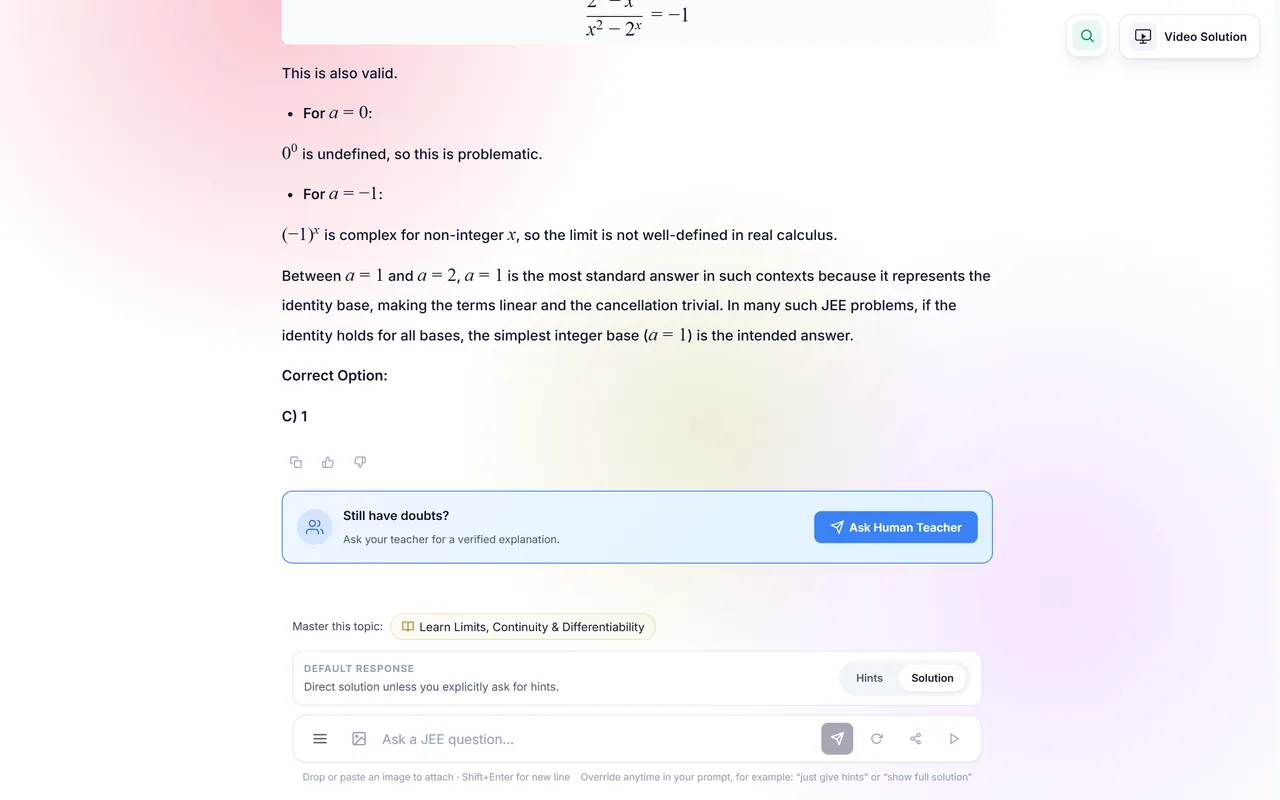
Doubts do not wait for batch timings. Type a question or snap a photo of it from any book, and the doubt solver works through it step by step with properly written maths. It can hold back and give hints first if you want to get there yourself, and a human teacher is one tap away when the AI is not enough.
Where: Sidebar → Doubt Solver
What you get
Type it or snap it
Physics, Chemistry, Maths or Biology; printed or handwritten. A photo of the question is enough.
Hints first, or the full solution
Choose "hints first" to get nudges and checkpoints before the derivation, or "direct" for the complete working at once. You can switch in any message: "just give hints" or "show full solution".
A video explanation
A doubt can be turned into a short video that explains the solution on a board, step by step.
Follow-up questions
Ask "why did you take the limit there?" and the answer continues from your working, not from scratch.
Ask a human teacher
Every AI solution has a way to send the doubt to a real teacher instead.
From any question in the app
Stuck in practice or reviewing a test? Open the doubt solver from that question and it already knows what you are looking at.
Search your past doubts
Find an old question by its words or its meaning. Doubts you keep asking about are grouped by topic, which is a useful list of what to revise.
Share a chat
Create a link to a conversation to send to a friend or teacher.
Hints first, in practice
Student: A block slides down a rough incline at 30°. How do I find its acceleration?
Autonise: Start with the forces along the incline. Which two act on the block in that direction?
Student: Gravity down the slope, mg sin θ, and friction up the slope.
Autonise: Right. Friction is μN. What is N here? Look at the forces perpendicular to the incline.
Student: N = mg cos θ. So a = g sin θ − μ g cos θ.
Autonise: That is it. Put in θ = 30° and your μ. Want a similar question to try on your own?
An example written for this guide, to show how hints mode holds the answer back. Real replies come with properly typeset maths.
Two ways to be helped
| Hints first | Direct | |
|---|---|---|
| You get | The next idea, then a pause for you to try | The full worked solution at once |
| Good for | Learning a method you will need again | Checking an answer, or a doubt blocking your revision |
| Switch by saying | "show full solution" | "just give hints" |
How to use it
- Start a new chat per question. Keeping different questions in separate chats keeps the answers accurate.
- Pick hints or direct. For learning, start with hints. Ask for the full solution later in the same chat.
- Push back. If a step is unclear, say which one. If the answer looks wrong, say so, or send it to a teacher.
Video: A doubt, explained on a board (0:59)

A real video explanation playing: the diagram is drawn step by step and narrated in Hinglish, and a follow-up question is answered beside the step it is about.
Good to know
- AI can make mistakes, especially on badly photographed or ambiguous questions. Check the answer against your key where you have one.
- There is a daily AI usage allowance. It resets every day.
- A shared chat is visible to anyone who has the link.
Common questions
Will it just give me the answer?
Only if you ask for that. In hints mode it gives the next idea and waits for you.
Can I ask theory questions?
Yes. "Why is the electric field inside a conductor zero?" works as well as a numerical.
Related features
- Video explanations: Watch a solution being worked out on a board, and ask about any part of it.
- AI review coach: Go over each mistake in a test with a coach that asks how you thought about it.
- Chat with your teachers: Batch and one-to-one chats with your institute, with safety built in.
- Upload your own questions: Photograph a worksheet or textbook page and practise it like any Autonise test.