The real exam screen
The same computer-based test layout NTA uses, so exam day holds no surprises.
Marks are lost on exam day to things that have nothing to do with Physics: a palette you misread, an answer you thought was saved, a timer you forgot. Every test on Autonise runs in a screen modelled on the real computer-based test, with the same buttons and the same rules, so the interface is muscle memory long before the exam.
Where: Opens with every test
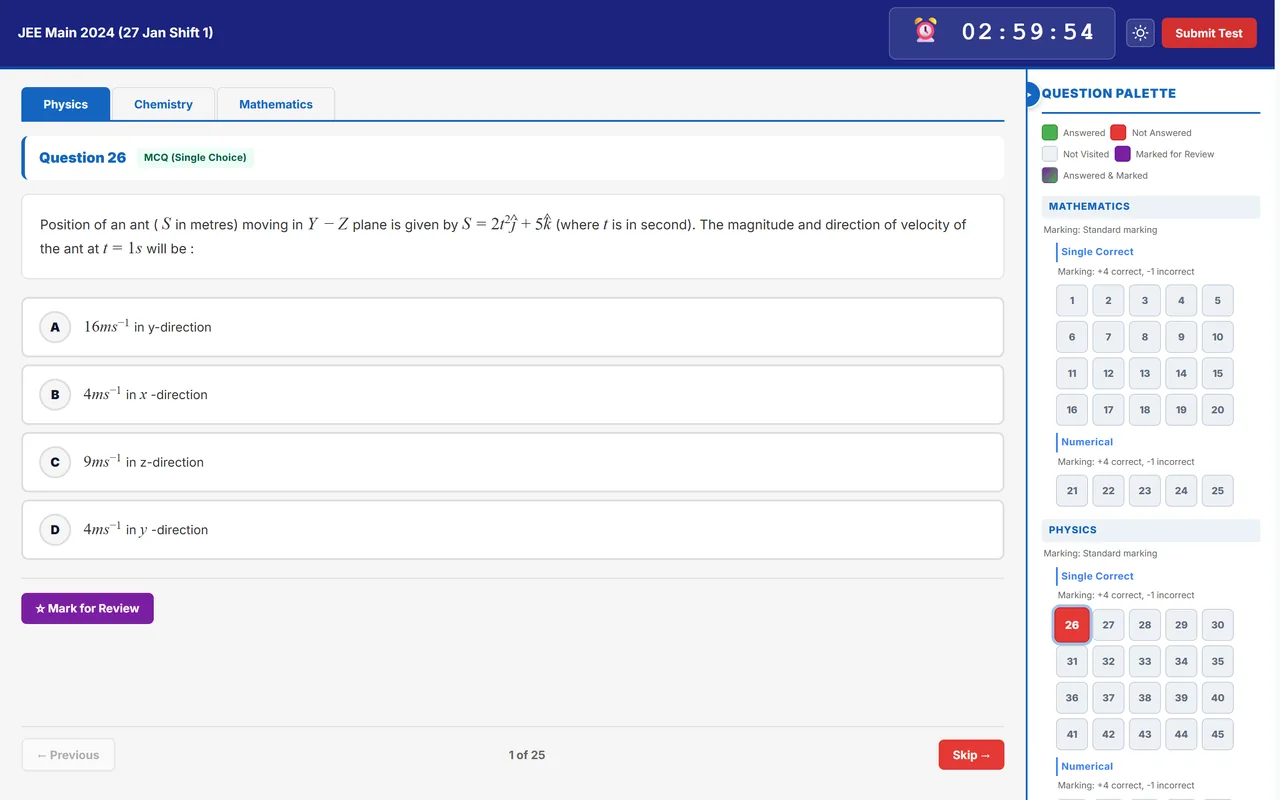
What is on the screen
Question palette
Each question shows its status: not visited, not answered, answered, marked for review, or answered and marked. An answered question that is marked for review still counts.
Save & Next, Mark for Review, Clear Response
The buttons behave exactly like the real exam. Jumping from the palette does not save the answer on screen, just as in the hall.
Instructions and declaration
Tests begin with the general instructions page and the declaration tick box, including how matrix-match and partial marking work in that paper.
Countdown and auto-submit
The timer runs in the corner and the paper submits itself at zero.
On-screen calculator for JEE Advanced
JEE Advanced mocks and past papers have the basic calculator the real exam now provides: add, subtract, multiply, divide, percent, square root, memory and a history.
Answers survive a bad connection
A small badge shows your answers are safe while the signal is gone. If time ends while you are offline, the paper is submitted as soon as you reconnect.
Count it as study time
Tick one box before you start and the test is logged in your study timer automatically.
The question palette, decoded
| Status | What it means | Counted for marks? |
|---|---|---|
| Not visited | You have not opened the question yet | No |
| Not answered | Opened, but no answer saved | No |
| Answered | An answer is saved | Yes |
| Marked for review | Flagged to come back to, with no answer | No |
| Answered and marked for review | An answer is saved, and flagged to recheck | Yes |
An answer counts only once it is saved with Save & Next. Jumping to another question from the palette does not save it.
Rules worth knowing
- In tests set by an institute, switching tabs or leaving the window repeatedly is treated as suspicious and can auto-submit the test.
- Written questions in a test can be typed, or written on a printed answer sheet and photographed.
Common questions
Does the screen work on a phone?
Yes. On a phone the palette and calculator move behind buttons. For full mocks a laptop or tablet is closer to the real thing.
Related features
- Previous year papers: More than 20 years of real papers, taken as timed tests in the real exam screen.
- Ranked mock tests: Full-length mocks scored against everyone else who took them, with a leaderboard.
- Works when the internet does not: Your dashboard, recent results and timer open offline, and test answers stay safe.
- Study timer and tracker: Stopwatch, Pomodoro and countdown, with streaks, goals and a daily questions target.